

 ไทย
ไทย
nslookup is an essential tool for developers and network administrators who need to analyze and troubleshoot issues related to the Domain Name System (DNS). In this article, we will introduce you to nslookup, covering its definition, usage methods, and applications in various tasks.
What is nslookup?
The meaning of nslookup
nslookup stands for Name Server Lookup, a command used to retrieve information from a DNS server. It helps verify domain names and IP addresses, as well as search for various types of DNS records, such as A Records, MX Records, and TXT Records.
Why is nslookup important?
The DNS system functions to convert human-understandable domain names (such as www.example.com ) into IP addresses that computers use for communication. nslookup helps us quickly verify and analyze issues related to these data conversions.
Key Features of nslookup
1. DNS Name Resolution Verification
nslookup can verify whether a domain or URL can be resolved to an IP address, helping to troubleshoot issues when a website cannot be accessed.
2. DNS Records Verification
This tool helps retrieve various types of DNS records:
- A Record: Specifies the IP address of a domain name
- MX Record: Points to the email server
- CNAME Record: Display subdomain settings
- TXT Record: A special text record, such as SPF or DKIM.
3. Analysis of DNS Server Response
You can use nslookup to check whether the DNS Server provides accurate and prompt responses.
4. Interactive Mode
nslookup has an interactive mode that allows users to execute consecutive commands within a single session, such as changing the DNS server or retrieving various types of information.
How to Use nslookup
Basic Usage
Basic commands of nslookup are used to retrieve DNS Record information of a domain name:
nslookup example.com
This command will display the IP address of the domain name and the DNS server providing the information.
Data Type Specification Usage
You can specify the type of DNS record you wish to search for, for example:
- Search MX Record:
nslookup -query=mx example.com - Search TXT Record:
nslookup -query=txt example.com
Specifying the DNS Server in Use
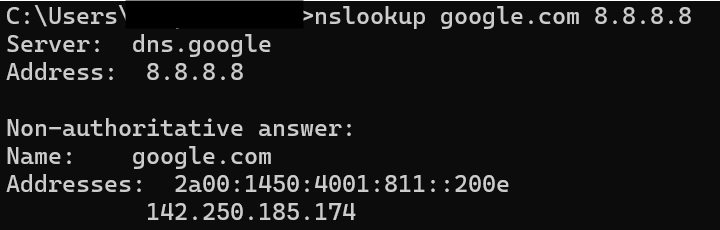
You can specify the DNS server that nslookup should use:
nslookup example.com 8.8.8.8
In this context, 8.8.8.8 is the Google DNS Server.
Using Interactive Mode
Start interactive mode with the command:
nslookup
You can then type additional commands in the session:
> server 8.8.8.8
> set type=mx
> example.com
Example of nslookup application
Network Problem Check
To check whether a website is inaccessible due to DNS or other issues:
nslookup example.com
Check whether the DNS Server’s response is correct or not.
Email System Planning
Retrieve MX Record data to verify that the email server settings are correct:
nslookup -query=mx example.com
Enhancing Email Security
Check the TXT record for SPF or DKIM to enhance security.
nslookup -query=txt example.com
Tips for Using nslookup
1. Choose a reliable DNS server.
DNS servers such as Google DNS (8.8.8.8) or Cloudflare (1.1.1.1) are stable and fast.
2. Understanding DNS Record Types
Learn the meaning of each type of DNS record, such as A, MX, CNAME, and TXT.
3. Conduct a thorough analysis of the results.
Information from nslookup may require further analysis to identify network issues.
Summary:
nslookup is a highly useful tool for managing DNS systems, whether it’s checking domain names, searching for DNS records, or analyzing network issues. By using nslookup effectively, you can plan and resolve DNS problems professionally.
