

 ไทย
ไทย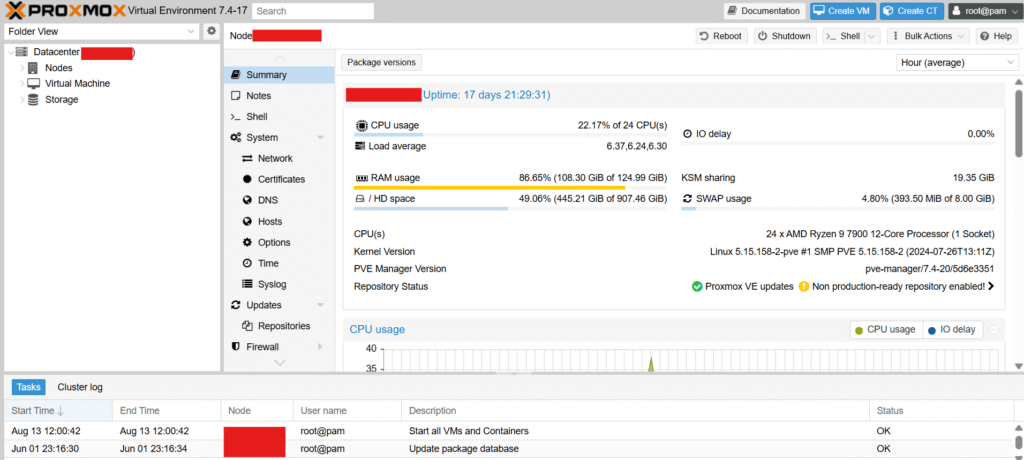
In an era where virtualization and containerization have become the core of IT infrastructure, organizations and system administrators must choose platforms that can meet the demands of stability, flexibility, and cost-effectiveness. One increasingly popular option is Proxmox Virtual Environment, or Proxmox VE.
What is Proxmox VE?
Proxmox Virtual Environment is an open-source system designed to manage virtual machines and containers within a single system. The key feature of Proxmox is its ability to utilize both KVM (Kernel-based Virtual Machine) and LXC (Linux Containers) technologies through an easy-to-use web interface.
This system was developed by Proxmox Server Solutions GmbH, a company based in Austria, and has gained continuous popularity among system administrators, developers, and organizations seeking a reliable and scalable alternative for their IT infrastructure.
Key Features of Proxmox
Open source and free to use
Proxmox is available for free use. You can download the source code and install it on your physical machine immediately without any license fees. Additionally, there is a community forum that provides support to users worldwide.
Supports both VMs and containers.
By integrating KVM and LXC, users can choose to create either full-system virtual machines or lightweight and fast containers within the same system.
User-friendly web interface
Proxmox comes with a Web GUI that supports HTTPS, allowing you to manage VMs, containers, networks, and storage directly from a browser without the need for additional software installation.
Backup and Snapshot Features
The system can back up virtual machines both fully and incrementally, while also supporting the creation of Snapshots to revert to previous states in case of errors.
High Availability (HA) System
If a cluster is configured, the system can automatically migrate VMs or containers to other hosts in the event of a primary machine failure, helping to ensure maximum system stability and availability.
System Components
KVM and LXC
KVM is used for creating full-fledged virtual machines (VMs), suitable for operating systems that require their own kernel. LXC, on the other hand, is ideal for applications that prioritize performance and resource efficiency.
Storage Management System
Proxmox supports connections to a wide range of storage types, such as ZFS, LVM, NFS, iSCSI, and Ceph, which can be configured via either the GUI or CLI.
Network System
Can configure network bridge, VLAN, bonding, and supports Software Defined Networking (SDN) for advanced network management
Rights and User Management
Proxmox supports Role-Based Access Control (RBAC), allowing you to assign access permissions for each VM or menu item. It also supports integration with LDAP and Active Directory.
Installation and Getting Started
Proxmox VE Installation
Users can download the ISO image from the official Proxmox website and install it directly onto a server. The installation process is similar to other Linux systems and can be performed via USB or CD.
Access via Web Interface
After successful installation, you can access the system immediately through a web browser by visiting https://[IP-Address]:8006. The system will prompt you to enter the username and password specified during the installation process.
Creating Your First VM
Users can create a new virtual machine through the interface by selecting the “Create VM” menu, choosing the desired ISO image for operating system installation, specifying the CPU, RAM, disk, and network sizes, and then starting it immediately.
Cluster and High Availability (HA) Usage
Proxmox supports the integration of multiple machines into a cluster using CLI commands such as pvecm create and pvecm add to create and join clusters. This configuration enables High Availability, Live Migration, and Centralized Management.
Backup System
Basic Backup
You can configure the system to automatically back up VMs or containers according to a scheduled timeline and choose to store them in local storage or remote storage.
Proxmox Backup Server
For a more comprehensive backup solution, Proxmox Backup Server can be used. This standalone software employs deduplication, compression, and encryption to maximize backup efficiency.
System Security
Proxmox supports Two-Factor Authentication (2FA), encrypted connections (SSL/HTTPS), role-based access restrictions, and an integrated firewall to control access to each VM or container.
Comparison with Other Virtualization Systems
| Qualifications: | Proxmox Virtual Environment | VMware ESXi | Hyper-V | VirtualBox |
|---|---|---|---|---|
| Free to use | ✅ | ❌ | ✅ | ✅ |
| Open Source | ✅ | ❌ | ❌ | ✅ |
| Web Interface | ✅ | ✅ | ✅ | ❌ |
| Supports Containers | ✅ | ❌ | ❌ | ❌ |
| HA System | ✅ | ✅ (Additional payment required) | ✅ | ❌ |
Who is it suitable for?
Proxmox is suitable for users of all levels, from individuals looking to set up a home server, developers needing a testing environment, to organizations requiring stable, scalable, and low-cost infrastructure.
Summary:
Proxmox VE is a powerful solution for managing virtual servers, offering a wide range of features including VMs, containers, clusters, high availability (HA), and backup, all in a single platform at no cost. It is an ideal choice for organizations seeking stability, flexibility, and budget efficiency.
