

 ไทย
ไทย
GeyserMC is a project that allows Minecraft Bedrock Edition players to connect to Minecraft Java Edition servers. In this article, we will explain how to install GeyserMC along with Floodgate, a plugin that enables Bedrock players to log in without a Java account.
Download GeyserMC and Floodgate

Before you begin the installation, you must download the following required files:
- Go to the GeyserMC.org website.
- Select Download and choose the version that matches your Minecraft server.
- For example, Spigot/Paper for plugin servers.
- Note: Geyser does not support mod servers (Forge), so modded servers cannot be played through the Bedrock Edition.
- Then, go to the Floodgate options.
- Download the Floodgate version that matches your Minecraft server.
- Upload the file to your Minecraft server and place it in the plugins or mods folder.
Steps to Install GeyserMC on a Minecraft Server
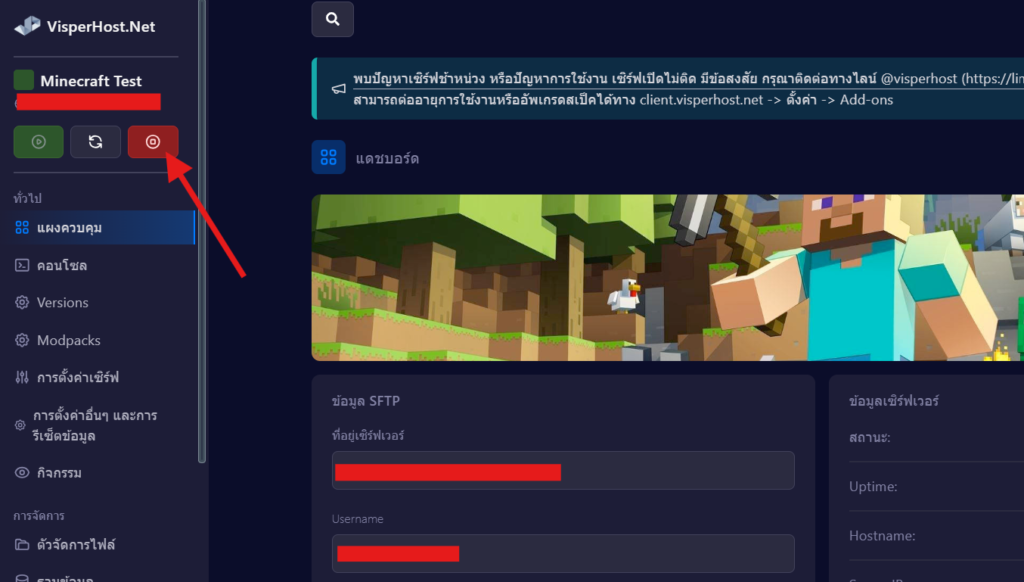
1. Stop the server.
- Go to your server control panel.
- Press the Stop button to shut down the server before installing the plugin.

2. Upload the GeyserMC and Floodgate files.
- Enter the menu, File Manager, located on the left side of the control panel website.
- Go to the plugins folder.
- Press the Upload button and select the downloaded files, such as Geyser-Spigot.jar and floodgate-spigot.jar, to place them in the plugins folder.
- Wait until the upload is 100% complete.
4. Open the Minecraft server.
- Return to the Dashboard page.
- Press the Start button to load the plugins on the server.
Test connection
After completing the setup, test the connection by
- Use the Minecraft Bedrock client.
- Enter the server’s IP address and the specified port.
- For example, 127.123.123.123:25623, enter IP: 127.123.123.123 and Port: 25623.
- Try logging in to check if everything is working properly.
Summary:
When you open a Minecraft server, installing GeyserMC on the server helps players from Bedrock platforms connect to Java servers more easily. If you follow the steps in this article, you will be able to set up GeyserMC correctly and have it ready for use.
Additional recommendations:
- Make sure your server is using PaperMC, Spigot, or Fabric.
- Use Floodgate if you want Bedrock players to join without needing a Java account.
