

 ไทย
ไทย
AnyDesk is a remote computer control program commonly used for providing technical support or accessing files and applications from a remote location. This article will teach you how to easily install Anydesk as follows: 1. Download the AnyDesk installer For Windows: For macOS: 2. Installation of Anydesk Program For Windows: For macOS: 3. Open the
Category Archives: How-To

Knowledge
What is CSS? The Meaning and Benefits of CSS in Website Development
CSS (Cascading Style Sheets) is a language used for designing and formatting websites, working in
Continue reading
20
Aug
Aug

Knowledge
What is HTML? The Basics Every Web Developer Must Know
HTML, or Hypertext Markup Language, is a markup language used to create and structure websites.
Continue reading
12
Aug
Aug

Knowledge
What is Magento? A world-leading e-commerce platform.
Magento is one of the most popular e-commerce platforms in the world. It is designed
Continue reading
05
Aug
Aug

Knowledge
What is Google Workspace? What can it be used for?
In today’s era, work demands speed and agility. Google Workspace has become a popular solution
Continue reading
29
Jul
Jul

Knowledge
What is MySQL? Advantages and Disadvantages of MySQL
MySQL is a widely used relational database management system (RDBMS) that is popular among developers
Continue reading
23
Jul
Jul

11
Jan
Jan
The use of the Linux operating system is highly popular among developers and system administrators due to its high level of security and the ability to customize it as needed. However, maintaining the security of user accounts is of utmost importance. One of the simplest and most effective methods to ensure security is to regularly

08
Dec
Dec
Uploading a Minecraft World This article will teach you how to upload a Minecraft world that you have already played to the Minecraft server of VisperHost. What to Prepare Steps to upload a Minecraft world to a server 1. Always shut down your Minecraft server first. 2. Install the Minecraft version or Modpack that matches
02
Dec
Dec
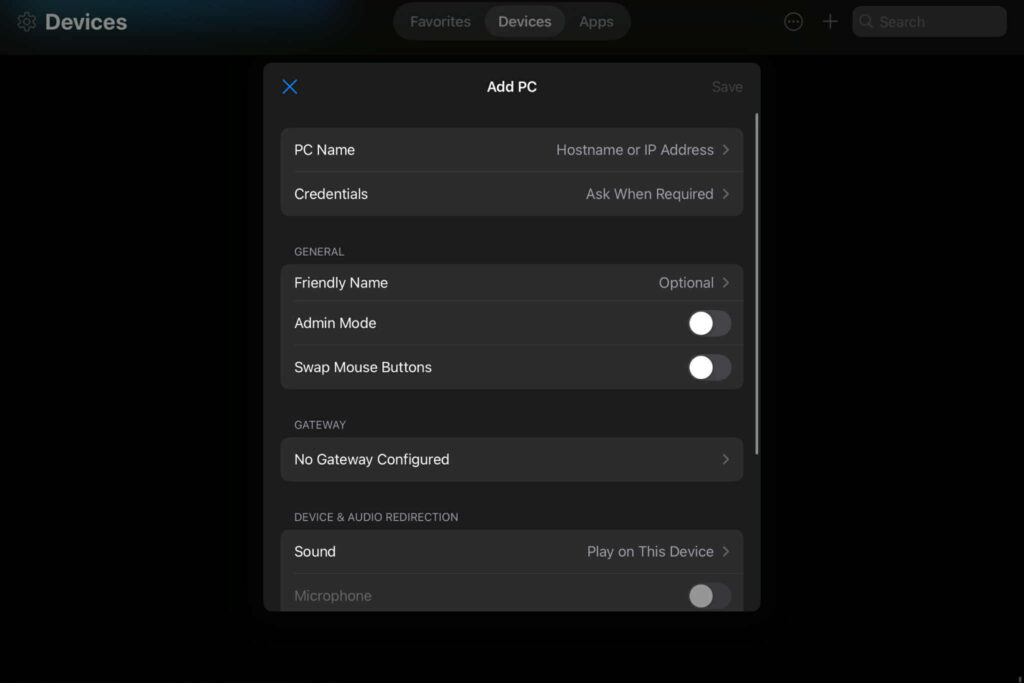
In an era where everything must be fast and accessible from anywhere, remotely accessing a VPS (Virtual Private Server) via mobile has become an extremely useful tool for system administrators, programmers, or website owners. Whether you use a Windows VPS or Linux VPS, you can easily manage your server with just a mobile phone and

29
Nov
Nov
What is ERR_SSL_PROTOCOL_ERROR? ERR_SSL_PROTOCOL_ERROR is a common error encountered when attempting to connect to a website that uses SSL (Secure Sockets Layer) to encrypt data. This error can occur due to several reasons, such as incorrect SSL settings on the website server, issues with your browser, or an unsecured internet connection. How does ERR_SSL_PROTOCOL_ERROR appear

14
Nov
Nov
Editing server game files is highly beneficial, whether for updating game files, modifying configurations, or adding mods. One popular program for this purpose is WinSCP, which is user-friendly and convenient for managing files on servers. In this article, we will introduce you to the detailed and easy-to-understand method of using WinSCP to upload files to

13
Nov
Nov
Access Windows VPS via Remote Desktop Program: How to Remote into Windows VPS Step 1: Prepare login information (RDP) 1.1) You will receive information for remote access to the VPS via your email or from your VPS provider, which includes: Step 2: Open the Remote Desktop program. 2.1) In your Windows operating system, search for

13
Nov
Nov
GeyserMC is a project that allows Minecraft Bedrock Edition players to connect to Minecraft Java Edition servers. In this article, we will explain how to install GeyserMC along with Floodgate, a plugin that enables Bedrock players to log in without a Java account. Download GeyserMC and Floodgate Before you begin the installation, you must download

13
Nov
Nov
Using admin commands in a Minecraft server is essential for system administrators, as it helps manage the game world more conveniently and efficiently. How to give the op permission to enable admin commands Before you can use admin commands, you must first have OP (Operator) privileges. To do so, follow these steps: How to Give

13
Nov
Nov
Customers can upgrade their current service packages, such as hosting, Cloud VPS, or other services, by themselves through the website https://client.visperhost.net. The steps are as follows: Step 1: Log in to the Client Area Step 2: Access your service page. Step 3: Proceed with the package upgrade. Step 4: Make payment for the upgrade Step
